sábado, 3 de marzo de 2018

#EduGoalsMooc The Goal Minded Teacher: Challenges to Transform Student Learning WEEK 3 CHALLENGE #2:

#EduGoalsMooc The Goal Minded Teacher: Challenges to Transform Student Learning 

WEEK 3 CHALLENGE #2: Reflections upon our students' (& my own) digital footprint.

After dealing with Digital Learning Theories, we have been faced with the importance of making our students aware of their own digital footprint. 
First we had to read some articles about different aspects about digital footprints:

  • Some of them dealt with basic facts our students' should learn about what they post online. 
  • Some others were lesson plans that deserve a look and that, some way or another, I will try to adapt to my students. Here you have them numbered: 1, 2 & 3. 
  • A couple of them were about how adults, even scholars, tend to have little care when it comes to posting or taking things from granted on the internet. 
All this care and attention required to have a professional coherent digital footprint may seem a little bit disappointing or such a big an effort, especially when we take into consideration the 1001 social apps that show up every month. 

  • One of them, Snapchat, take things a little further promising users that post will be deleted, a promise which we cannot be completely sure about being fulfilled. 
  • Some others enable  music videos recording and sharing while others allow to produce many different versions of pictures, text, sound and video "intercourses".
After that, we are invited to share and analyze the results of a survey on Digital Footprints that we have previously adapted from a Google Doc template. Mine has been answered by 23 kids, aged 10-19, most of whom are my students from 11th & 12th grades, the rest being some of my oldest nephews and nieces. That's why 82% of the answerers are between 16 and 18 years old. 


Gráfico de respuestas de formularios. Título de la pregunta: ¿A qué edad te uniste a tu primera red social? - At what age did you join your first social network?. Número de respuestas: 23 respuestas.

One of the most surprising  conclusions that can be drawn from this survey is that the first time my students used an electronic device was at 10 years old, exactly the same age at which most of them (30%) first accessed the internet. Also from 10 -12, 65% of them joined their first social network. 
This coincidence is highly significant . It seems that they are born to the internet when they turn 10 years old, which coincides with the social/religious occasion when most kids are given their first cell phone.
Gráfico de respuestas de formularios. Título de la pregunta: ¿A qué edad usaste por primera vez un dispositivo electrónico (Game Boy, iPad, teléfono móvil, tablet, vídeo-consola, etc.)? - At what age did you first use a computing device (Game Boy, iPad, cell phone, tablet, gaming console, etc.)?. Número de respuestas: 23 respuestas.Gráfico de respuestas de formularios. Título de la pregunta: ¿A qué edad entraste por primera vez a Internet? - At what age did you first access the Internet?. Número de respuestas: 23 respuestas.

On the other hand there is a contradiction between the parental care  shown by the facts that 82% of kids were allowed to join their first social network and that 96% of parents tell their children about internet security whereas  77% of kids suffer a complete lack or scarce attention from their parents in terms of revision and check of the contents they access online.
Gráfico de respuestas de formularios. Título de la pregunta: ¿Te dieron permiso tus padres para unirte a cada una de las redes sociales a las que te has unido? - Did your parents give you permission to join each of these social networks?. Número de respuestas: 23 respuestas.Gráfico de respuestas de formularios. Título de la pregunta: ¿Te han hablado alguna vez tus padres sobre seguridad en internet? - Have your parents ever talked to you about Internet safety?. Número de respuestas: 23 respuestas.


Gráfico de respuestas de formularios. Título de la pregunta: ¿Comprueban tus padres lo que haces en la red? - Do your parents check what you do online?. Número de respuestas: 23 respuestas.

Finally, I would also like to comment on the high percentage of students that have shared personal videos or pictures on the internet, something directly linked with the Digital Footprint left by any of them. Luckily, Is spite of the early age they started leaving a footprint online, 87% deny having been bullied online.
Gráfico de respuestas de formularios. Título de la pregunta: Edad - Age. Número de respuestas: 23 respuestas.
Gráfico de respuestas de formularios. Título de la pregunta: ¿Con qué frecuencia compartes fotos de tí mismo/a en internet? - How often do you share photos of yourself online?. Número de respuestas: 23 respuestas.Gráfico de respuestas de formularios. Título de la pregunta: ¿Cuántos videos has creado y subido a la red? - How many videos have you created and posted online?. Número de respuestas: 23 respuestas.
Gráfico de respuestas de formularios. Título de la pregunta: Te has sentido acosado/a a través de internet alguna vez? - Have you ever been bullied online?. Número de respuestas: 23 respuestas.

#EduGoalsMooc: The Goal Minded Teacher: Challenges to Transform Student Learning. WEEK 3 CHALLENGE #1:

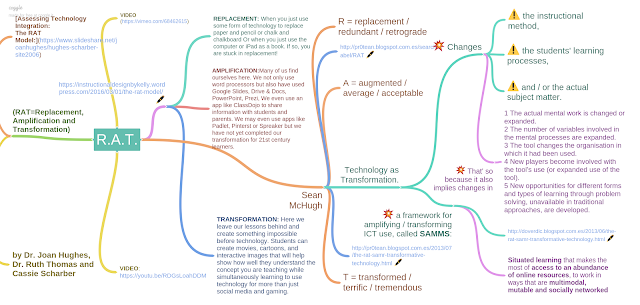
#EduGoalsMooc: The Goal Minded Teacher: Challenges to Transform Student Learning. WEEK 3 CHALLENGE #1: Create a mindmap of one of the digital learning theories.

The first task we have been asked this week at #EduGoalsMooc has been to create a mindmap of one of the Several Learning theories I have been able to know during the first days of this week. I have to admit I knew nothing about Digital Learning Theories, but I had the feeling that although  I was trying to do my best to catch up with technology and use it coherently and consistently in classroom  with my students, there was something wrong in the way I was doing it. On the other hand, I had never made a mindmap before: It was nor common in the 70s when I was at school and have never considered them necessary to teach ESL.
We teachers have to link balance our students' likes and needs with the curricula of subjects, issued by administrations in terms of goals, criteria, contents and standards and with the rank of law, which must be obeyed. Among the first group we find some skills our students need to meet in order to live in a connected and digital world. Some of these skills include:

  1. digital safety and citizenship,
  2. literacy,
  3. research skills, 
  4. creativity with digital tools and programs, 
  5. visual rhetoric, collaboration,
  6. design, coding, project management, and problem solving.
Digital learning theories and approaches allow us  to adapt our curricula within a framework to make sure our students gain these skills. They propose  stages or degrees of digital technology use and learning and give us project ideas, lesson plans and activity examples. They also provide us with guidelines and criteria for deciding on which websites, apps, and web resources provide our students with the best ways to use technology. 

Among these Digital Learning Theories, we have been able to read about:


After reading all those articles and some others in embedded links in them, I found that some of them exposed very interesting frameworks about knowledge creation or different taxonomies of activities and resources. However, I chose the R.A.T. MODEL for my mindmap because it seemed more connected with my teaching practice and also because the concept below it lets me set a S.M.A.R.T. goal, and that's why we're here: Moving from  REPLACEMENT level of technology integration to the TRANSFORMATION one implies a good deal of methodogical and a significant and valuable challenge for me to achieve.


Apart form the pages suggested in the #EduGoalsMooc blog and cited above(see R.A.T. & THE RAT MODEL), I also found useful reading the original paper by the authors of the theory: Assessing Technology Integration: The RAT Model (=Replacement, Amplification and Transformation) (by Dr. Joan Hughes, Dr. Ruth Thomas and Cassie Scharber). 
In addition, I also found useful reading  entries in a couple of blogs:
The RAT Model in Instructional Design By Kelly 21st Century Learning Examples, Ideas, and Discussion
The RAT Model in Instructional Design by Kelly 


1.-  The RAT Model in Instructional Design By Kelly 21st Century Learning Examples, Ideas, and Discussion, where she states that RAT is a Digital Learning Framework that allows us to evaluate and determine the usefulness of our current lesson plans as they relate to the ISTE standards and can help to motivate us to improve them so that learning is relevant, fun, and exciting for our students! She defines the three steps of the model by asking herself questions as a teacher and trying to answer them. Thus,

      • REPLACEMENT: Are your lessons just taking some form of technology and replacing it for the paper and pencil or chalk and chalkboard?  Are you just using the computer or iPad as a book?  If so, you are stuck in replacement!  She suggests checking Cool Tools for School to find apps to include in our lesson plans.
      • AMPLIFICATION: We are proud of ourselves for going beyond the basic word processing and have used Google Slides, PowerPoint, Prezi, (...).  We might even use an app (...) to remind our students of tests (...) or of anything else that may be pertinent to our classroom.  (...)  We should be proud of ourselves for amplifying our lesson plans and using technology to improve the efficiency and educational quality of student learning…but we have not yet completed our transformation for 21st century learners.
      • TRANSFORMATION: It is here where we take our lessons and create something we never would have thought possible before technology. (...)  They can create movies, cartoons, and interactive images that will help show how well they understand the concept you are teaching while simultaneously learning to use technology for more than just social media and gaming.
    2.- Then I came across Sean McHughs' blog where I found an interesting point of view about the phases of the RAT Model. He adds some adjectives to each of the steps, enabling a kind of visual understanding of where you are and where you want to be:
      • R: replacement - redundant - retrograde
      • A: augmented - average - acceptable
      • T: transformed - terrific - tremendous
    Besides those funny adjectives, McHugh takes then the role of technology into consideration, regarding it a tool to transform the instructional method, the students' learning processes, and/or the actual subject matter in such a way that 

    1 The actual mental work is changed or expanded 
    2 The number of variables involved in the mental processes are expanded
    3 The tool changes the organisation in which it had been used 
    4 New players become involved with the tool's use (or expanded use of the tool). 
    5 New opportunities for different forms and types of learning through problem solving, unavailable in traditional approaches, are developed.


    Furthermore, he remarks that  [transformative use of ICTs] improves the process of bringing thought into communicable expressions in such significant ways that, once the tool is understood and used regularly, the user feels wanting if it is not available because it has opened up new possibilities of thought and action without which one comes to feel at a disadvantage. 

    After this research, creating, transformative work to create a mindmap, I have got a much more clear idea about the Digital learning theoretical frameworks and, more important, about what I can do to make my classes technologically transformed.

    Finally, I include a video  which also explains this Digital Learning Theory:

    The RAT Framework from UWC South East Asia on Vimeo.

    LAST POST ADDED

    Durante este mes de noviembre de 2020 he participado en el curso del CEP Lebrija denominado HERRAMIENTAS DIGITALES FORMADORAS Y EVALUADORAS ...